Thaum xaiv lub teeb liab receiver rau kojhluav taws xob cua ntsuas, muaj ntau yam teeb meem compatibility los xav txog:
Zaus compatibility: Cov twj siv hluav taws xob sib txawv tuaj yeem ua haujlwm ntawm ntau zaus rau kev sib kis. Lub teeb liab receiver uas koj xaiv yuav tsum muaj peev xwm ua hauj lwm nyob rau hauv ntau zaus ntawm koj cov cuab yeej. Piv txwv li, yog tias koj lub cuab yeej siv lub xov tooj cua tshwj xeeb rau kev sib txuas lus wireless, lub receiver yuav tsum tau hloov mus rau tib lub zaus band kom tau txais cov teeb liab kom raug.
Raws tu qauv compatibility: Cov cuab yeej hluav taws xob hluav taws xob tuaj yeem siv ntau yam kev sib txuas lus los encode thiab xa cov ntaub ntawv. Lub teeb liab receiver yuav tsum sib haum nrog cov txheej txheem siv los ntawm koj lub cuab yeej. Qhov no ua kom ntseeg tau tias tus txais tuaj yeem txiav txim siab raug thiab ua tiav cov khoom xa tuaj. Qee cov txheej txheem siv hauv cov twj paj nruag suav nrog MIDI (Musical Instrument Digital Interface) thiab cov txheej txheem tsim los ntawm cov tuam txhab tsim khoom tshwj xeeb. Yog tias koj lub cuab yeej siv cov txheej txheem uas tsis yog tus qauv lossis tshwj xeeb, koj yuav tsum nrhiav ib tus neeg txais kev pabcuam uas tau tsim tshwj xeeb los ua haujlwm nrog cov txheej txheem ntawd.
Kev sib txuas hom compatibility: Xav txog txoj kev sib txuas ntawm qhov ntsuas thiab lub receiver. Feem ntau muaj ob hom kev sib txuas tseem ceeb - wired thiab wireless. Yog tias koj lub ntsuas hluav taws xob tsim los rau kev sib txuas, lub receiver yuav tsum muaj cov chaw nres nkoj tsim nyog (xws li USB, MIDI, lossis lwm yam tshwj xeeb txuas) kom phim lub ntsuas qhov tso zis. Ntawm qhov tod tes, yog tias koj xav tau kev sib txuas wireless, tus txais thiab cov cuab yeej yuav tsum tau txhawb nqa tib lub tshuab wireless (xws li Bluetooth, Wi-Fi, lossis ib qho kev sib txuas lus wireless) thiab tuaj yeem tsim kom muaj kev sib txuas ruaj khov.
Lub zog compatibility: Lub teeb liab receiver yuav xav tau ib lub hwj huam mov tshwj xeeb thiab tam sim no ua haujlwm kom raug. Xyuas kom tseeb tias lub hwj chim xav tau ntawm lub receiver yog sib xws nrog lub hwj chim qhov chaw uas koj muaj los yog hais tias lub receiver los nrog nws tus kheej lub hwj chim adapter uas yog haum rau koj cov ntaub ntawv siv. Tsis tas li ntawd, yog tias lub receiver yuav tsum tau siv nrog rau lwm yam khoom siv, xws li lub amplifier los yog lub suab kaw lus, xyuas kom meej tias lub hwj chim ntawm tag nrho cov cuab yeej siv tau sib xws kom tsis txhob muaj teeb meem txog hluav taws xob.
Qhov sib txawv ntawm impedance: Impedance yog ib qho kev ntsuas ntawm qhov kev tawm tsam ntawm qhov ntws ntawm hluav taws xob tam sim no hauv Circuit Court. Lub impedance ntawm lub tshuab hluav taws xob cua tshuab thiab lub teeb liab receiver yuav tsum tau sib phim rau kev pom kev hloov pauv. Yog tias qhov impedance tsis zoo sib xws, nws tuaj yeem ua rau lub teeb liab poob, distortion, lossis lwm yam teeb meem kev ua haujlwm. Xyuas cov impedance specifications ntawm ob lub ntsuas thiab lub receiver kom paub tseeb tias lawv sib xws.
Software compatibility: Qee tus neeg txais cov teeb liab siab heev yuav xav tau cov software tshwj xeeb lossis cov tsav tsheb kom ua haujlwm tau zoo. Yog tias koj lub khoos phis tawj lossis lwm yam khoom siv tau koom nrog hauv kev teeb tsa lossis rov ua haujlwm, nco ntsoov tias tus txais software tau sib xws nrog lub operating system thiab lwm yam software uas koj siv. Qhov no suav nrog kev ua kom ntseeg tau tias tus neeg txais tuaj yeem lees paub thiab teeb tsa kom raug los ntawm cov software cuam tshuam thiab tsis muaj qhov tsis sib haum xeeb uas yuav cuam tshuam rau kev ua haujlwm.
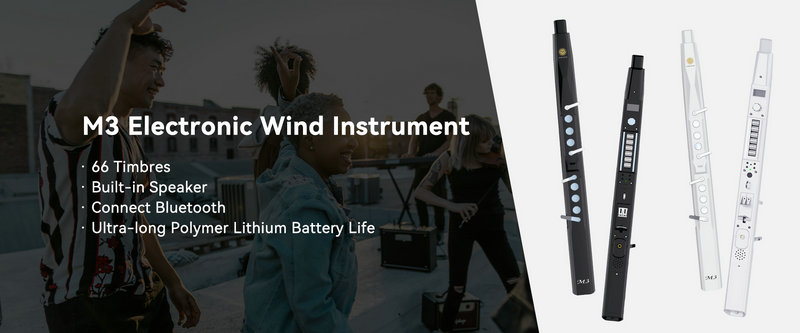
SUNRISE MELODY M3 Electronic Wind Instrument-Qhov zoo tshaj plaws-muag Electronic Cua Instrument
. 66 Ib
. Built-in Speaker
. Txuas Bluetooth
. Ultra-ntev Polymer lithium roj teeb lub neej